





 Microsoft Fabric
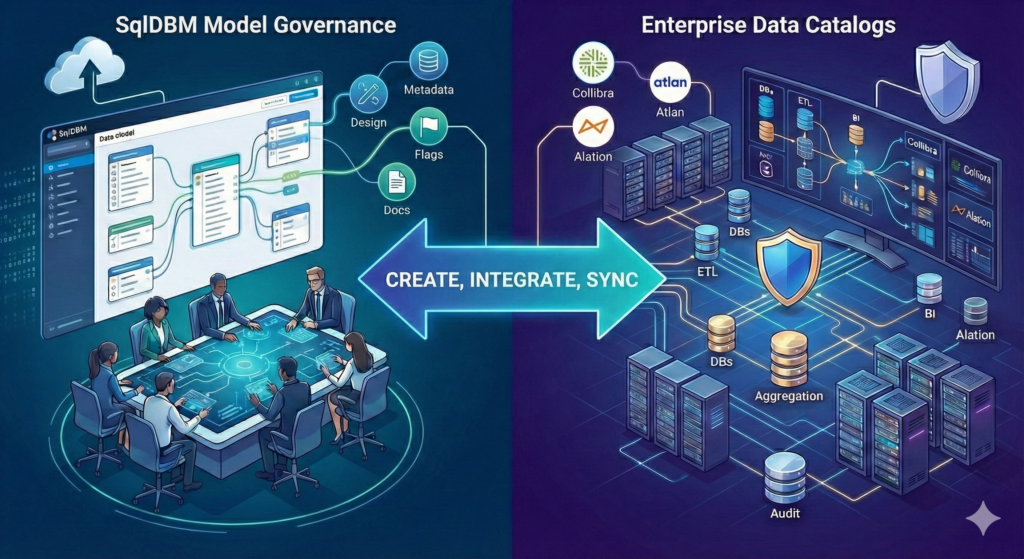
When evaluating data management tools, a common question arises: should we invest in a dedicated data catalog like Collibra, or can a modern data modeling platform like SqlDBM cover our governance needs?
The short answer: yes (and yes)!
SqlDBM can serve as both a standalone governance solution for teams building their data practice from the ground up, and as a specialized modeling layer that integrates seamlessly with enterprise catalogs for organizations that have already invested in them. Understanding when each approach makes sense requires a closer look at what each tool offers.
The Evolving Role of Data Modeling Tools
Traditional data modeling tools focused narrowly on schema design—diagramming tables, defining relationships, and generating DDL. The assumption was that governance, metadata management, and documentation belonged elsewhere, typically in separate tools maintained by separate teams.
That assumption no longer holds.
As data architectures have grown more complex, the line between modeling and governance has blurred. The people who design schemas often need to define business terms, track data ownership, flag sensitive columns, and document lineage—all activities that historically required a dedicated catalog.
SqlDBM embodies this evolution. What began as a cloud-native diagramming tool has expanded with a full Model Governance Suite that includes custom metadata fields, documentation pages, role-based permissions for data stewards, and searchable reports—similar to what enterprise data catalogs offer.
When SqlDBM Is Enough
For organizations just beginning their governance journey—or for teams that need lightweight, model-centric governance without the overhead of a dedicated catalog—SqlDBM offers a comprehensive feature set that may be all you need. Here are some features that help teams govern and discover data assets in both centralized and distributed team architectures.
Custom Metadata at the Source
Rather than retrofitting governance metadata after the fact, SqlDBM lets teams define it during the design phase. The Model Governance Fields feature allows users with a dedicated Governance role to create custom columns in the database documentation. These fields can capture source-target mappings, table owners, medallion architecture status, or any other attribute your team needs to track.
This approach embeds governance into the modeling workflow rather than treating it as a separate downstream activity. When your data dictionary lives alongside your schema, the two are kept in sync by design.
Object Flagging and Classification
Identifying sensitive data is a cornerstone of any governance program. SqlDBM’s Object Flagging feature allows teams to create and assign custom flags—PII, Financial, GDPR-relevant, or any classification scheme you define—to tables, views, and individual columns.
Flagged objects become searchable and filterable across the Database Documentation, Diagrams, and Database Explorer screens. This means a data steward can quickly surface all PII-containing columns across an entire project, or filter a diagram to show only objects requiring compliance review.
For Snowflake users, SqlDBM extends this capability with native support for Snowflake Tags, which are propagated to your database during forward engineering.
Standards Enforcement with Global Standards
Governance at scale requires consistency. SqlDBM’s Global Standards feature provides a centralized repository where enterprise architects can define organizational standards—glossary terms, naming conventions, and templates—and enforce them across participating projects.
Unlike optional guidelines that teams may or may not follow, Global Standards are enforced: child projects must accept and apply updates from the standards repository before saving their own changes. This creates a unified framework that prevents the fragmentation that often occurs when distributed teams operate independently.
When standards are enforced programmatically, data architects and reviewers save time by eliminating the need to manually check and redo requirements. More importantly, teams maintain consistency and lessen cognitive load when consuming data, which ultimately saves time and reduces the potential for human error.
Templated Consistency
Repeatable patterns reduce errors and accelerate development. Table Templates and Column Templates allow teams to define pre-configured object definitions—complete with standard columns, naming conventions, colors, flags, and even Snowflake tags—that can be instantiated with a single click.
Whether you’re building Data Vault structures (hubs, links, satellites) or maintaining consistent staging tables, templates ensure that new objects conform to established patterns from the moment they’re created.
Documentation and Reporting
A data dictionary is only useful if people can find and understand what’s in it. SqlDBM’s Database Documentation screen provides a single interface for searching and maintaining object properties across an entire project.
Beyond object-level documentation, the governance suite supports full-length content pages with embedded images, diagrams, and formatting. These pages allow teams to document project-level concepts—KPI definitions, business terms, architectural decisions—that don’t fit neatly into a table-by-table structure.
For stakeholders who need read-only access, SqlDBM generates searchable HTML reports that present the complete data dictionary in a browsable format, no SqlDBM login required.
Role-Based Access for Governance Teams
The Model Governance role separates modeling permissions from governance permissions, allowing data stewards to maintain metadata, create documentation pages, and manage flags without needing full modeler access. This supports organizations that want dedicated governance personnel working alongside—but distinct from—the data engineers who build the physical schemas.
The Admin Console provides enterprise-grade user management, including support for user groups, role assignments, and access auditing.
When You Need Both
For larger organizations with established data catalogs like Collibra, Alation, or Atlan, the question isn’t whether to replace those investments—it’s how to connect them to your modeling practice.
Enterprise data catalogs excel at aggregating metadata from across the technology stack: databases, ETL tools, BI platforms, data quality systems. They serve as the central hub where business users discover data assets, data stewards manage classifications at scale, and compliance teams track lineage across hundreds of systems.
What catalogs often lack is a native design capability. They can document what exists in production, but they don’t help you design what should exist next. They aslo lack robust visualizations to help users explore their data topologies through easy-to-navigate diagrams. SqlDBM fills this gap that catalogs weren’t built to address.
API Integration for Metadata Synchronization
SqlDBM’s REST API provides programmatic access to project metadata, enabling integration with external cataloging tools. The API supports retrieving project objects, DDL, alter scripts, and dbt properties in JSON format—exactly the data a catalog needs to stay synchronized with your models.
The documented use case is explicit: organizations can automate the flow of schema information from SqlDBM to cataloging tools like Collibra, ensuring that designs created in the modeling layer are reflected in the governance layer without manual re-entry.
This bidirectional awareness is valuable even for organizations that use Collibra (or similar) as their system of record. Rather than duplicating governance metadata in two places, teams can use SqlDBM for design-time governance and rely on the API to publish curated metadata to the enterprise catalog when ready.
iFrame Embedding for Visual Context
Data catalogs are comprehensive, but they’re not always visual. A business user browsing Collibra can see tables, columns, and descriptions—but understanding how those elements relate to each other often requires a diagram.
SqlDBM’s iFrame sharing capability allows organizations to embed live diagrams directly into Collibra or any other platform that supports iFrame widgets. The embedded content displays the latest project revision by default (or a fixed historical snapshot if preferred), so catalog users can visualize database structures in real time without leaving their familiar workspace.
This integration enriches the catalog experience without requiring SqlDBM accounts for every viewer. Governance teams maintain the source of truth in Collibra; visual context comes from SqlDBM.
Revision Tracking for Change Auditing
Enterprise governance requires auditability. SqlDBM maintains a complete revision history for every project, and Revision Flags allow teams to annotate individual revisions with status indicators—bug fixes, incidents, deployments—that make change history meaningful rather than just chronological.
These flags integrate with Jira tickets, creating a traceable connection between schema changes and the project management artifacts that motivated them. Combined with the API, this history can be surfaced in external systems as part of a broader audit trail.
dbt Integration for Analytics Engineering
For organizations using dbt, SqlDBM bridges physical modeling and transformational logic. Model Governance fields can be designated as dbt-enabled, automatically generating the corresponding YAML properties without hand-editing configuration files.
Standard dbt source and model properties—tests, freshness checks, documentation—are available as pre-configured fields in the Database Documentation interface. This means analytics engineers can maintain dbt configurations from the same interface where physical schemas are designed, and the resulting YAML stays synchronized with the model.
Moreover, SqlDBM allows users to visually label database objects as dbt sources and models (manually and through automated manifest upload), making it the only tool to display a multi-dimentional view (relational or data pipeline layout) of the data landscape.
Choosing Your Path
The decision between using SqlDBM as your governance hub versus integrating it with an enterprise catalog comes down to organizational scale and existing investments.
Start with SqlDBM if:
- Your team is new to formal data governance and needs an accessible starting point
- Your governance scope is primarily model-centric—tracking metadata for designed objects rather than discovered assets
- You want governance embedded in the design workflow rather than bolted on afterward
- Budget or complexity constraints make a dedicated catalog impractical
- You’re working primarily with cloud data warehouses where SqlDBM has native connectivity
Add a dedicated catalog if:
- You need to aggregate metadata from dozens of heterogeneous sources across the enterprise
- Compliance requirements demand centralized lineage tracking across all systems
- You’re operating at a scale where specialized stewardship workflows justify the investment
- Your organization has already invested in a catalog and needs to integrate modeling into that ecosystem
The good news is that these paths aren’t mutually exclusive. Organizations can begin with SqlDBM’s governance features, building muscle memory around metadata management and standards enforcement, and later integrate with an enterprise catalog as their practice matures. Conversely, teams with established catalogs can adopt SqlDBM to strengthen their design-time governance without disrupting existing workflows.
Conclusion
The question of whether SqlDBM competes with or complements dedicated data catalogs depends on your situation. For teams building their governance practice from scratch, SqlDBM’s Model Governance Suite provides a substantive, model-centric approach that may be entirely sufficient. For organizations with mature catalog investments, SqlDBM slots into the design and modeling workflow, publishing metadata and visual context to the catalog through APIs and embeds.
What distinguishes SqlDBM’s approach is the conviction that governance should begin at design time rather than being retrofitted after deployment. When metadata, flags, standards, and documentation live alongside the schema, they stay synchronized as the model evolves. That synchronization—whether the final destination is an HTML report, an iFrame, or an enterprise catalog—is what transforms governance from overhead into value.