


SqlDBM + Confluence
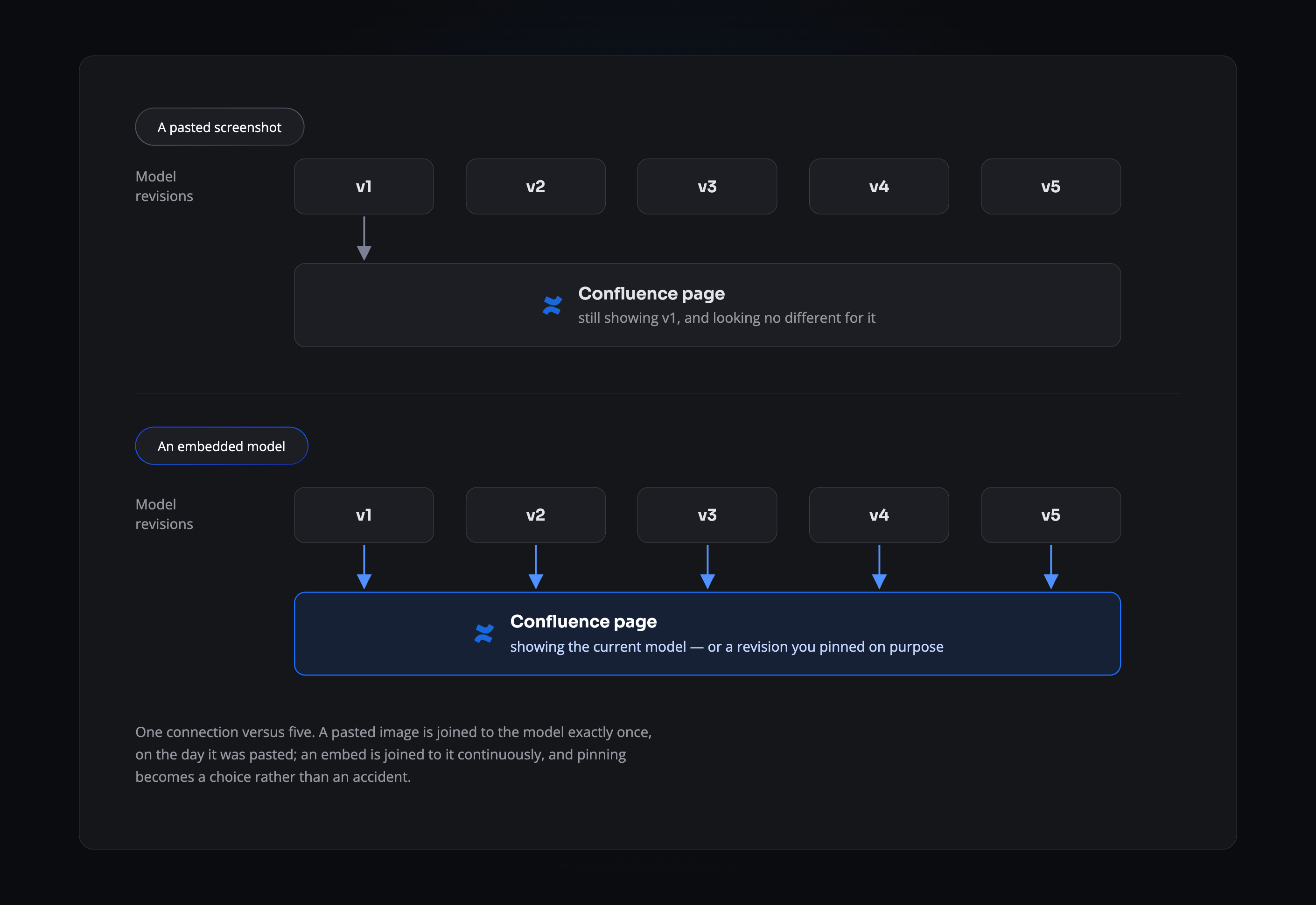
The diagram in your documentation stops being a screenshot somebody pasted in eighteen months ago.
THE PROBLEM
Every diagram in your wiki was accurate once
Someone exports the model, drops the image into a Confluence page, and moves on. The model keeps changing. The page doesn’t. A year later a new engineer reads that page, builds against what it shows, and finds the mismatch in review — or in production. Nobody maintains these images, because maintaining them was never anybody’s job.
- It ages invisibly. A stale diagram looks exactly like a current one.
- Nobody owns the refresh. Re-exporting the image has no ticket and no owner, so it doesn’t happen.
- Readers can’t check. Without a SqlDBM seat there’s no way to tell whether the picture still matches the database.
THE DIFFERENCE
A window, not a photograph
Type /SqlDBM on any Confluence page and pick what to show: a relationship diagram or a governance report, a whole project or one subject area. Choose Last Revision and the page tracks the model from then on. Choose a specific revision and it holds that version deliberately — which is what a design document usually wants.
WHAT READERS GET
Read the model without a seat
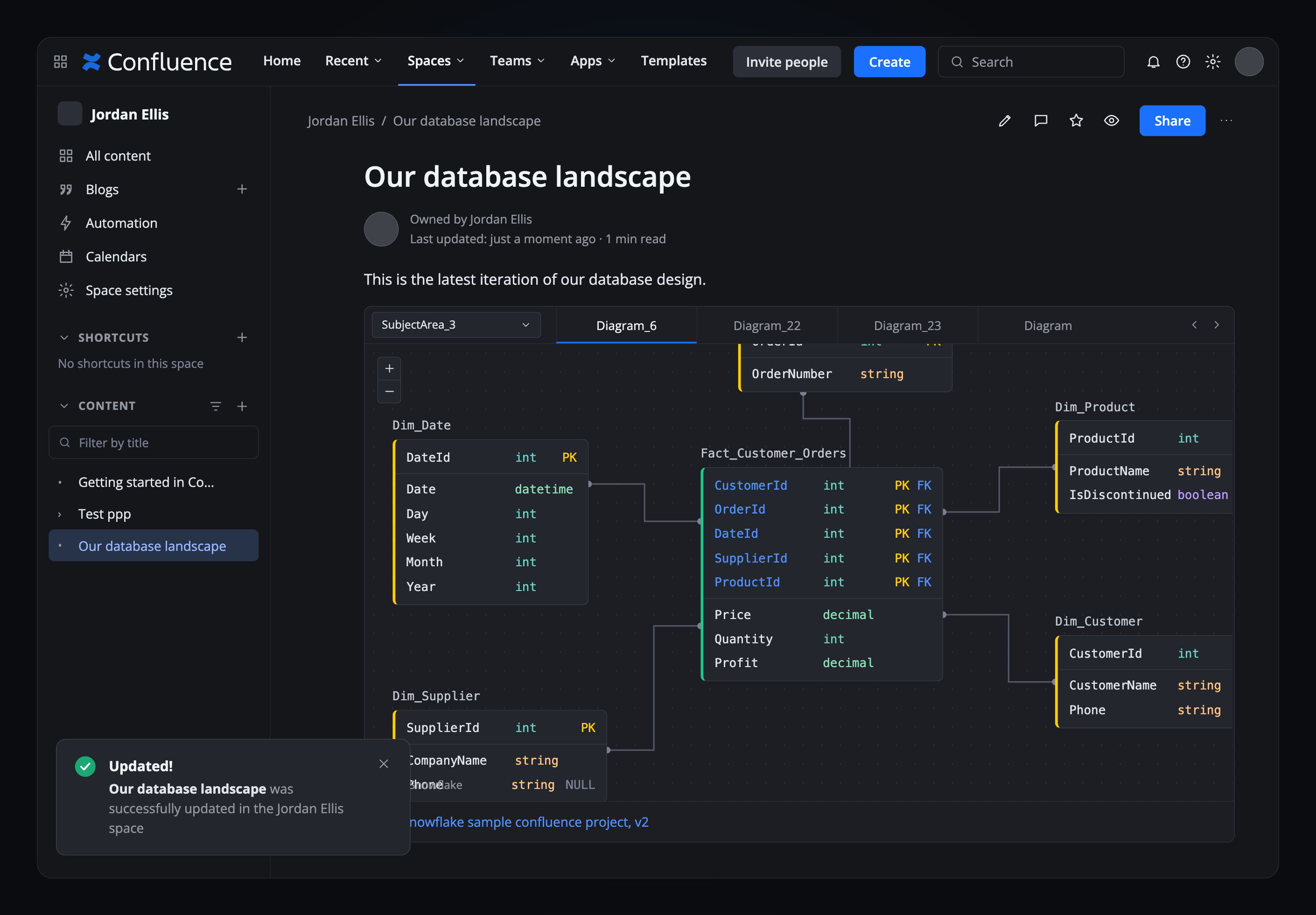
Anyone who can open the page can pan the diagram, zoom into a table and switch between subject areas. On an embedded report they can search every column, description and governance field, and read the comments attached to an object. No licence, no request to a modeller, no exported PDF going out of date in someone’s inbox.
Setting up the embed
1
Install from the Confluence Marketplace
Search for SqlDBM in the Apps menu and add it. You’ll need permission to install Marketplace apps, and Account Admin in SqlDBM to configure the connection.
2
Insert it on a page
In edit mode, type / then SqlDBM, or add it from the Insert menu.
3
Choose what to show
Pick the project, then a relationship diagram or a report page. Set the revision to Last Revision or a fixed one, narrow to a subject area or single diagram if you want, and set the frame height.
4
Publish
Save the page. Editors with a SqlDBM modeller role can change the selection later from the pencil icon, and adjust the width of the embed.
THE PAYOFF
What stops being somebody’s chore
Documentation updates itself
The page reflects the model as it is now. Nobody schedules a refresh, because there’s nothing to refresh.
Decisions keep their context
Pin an embed to a historical revision and a design document keeps showing the model as it was when the decision was made.
Stakeholders stop asking
People who need to see the model can see it, without a seat and without waiting for someone to export it for them.
One place to be wrong
If the model is wrong it’s wrong once, rather than in a dozen pages that quietly disagree with each other.
Related Integrations
Installing the app, embed properties and reader permissions, step by step.
Trusted by data teams globally
400,000+ users globally