


SqlDBM + Azure DevOps
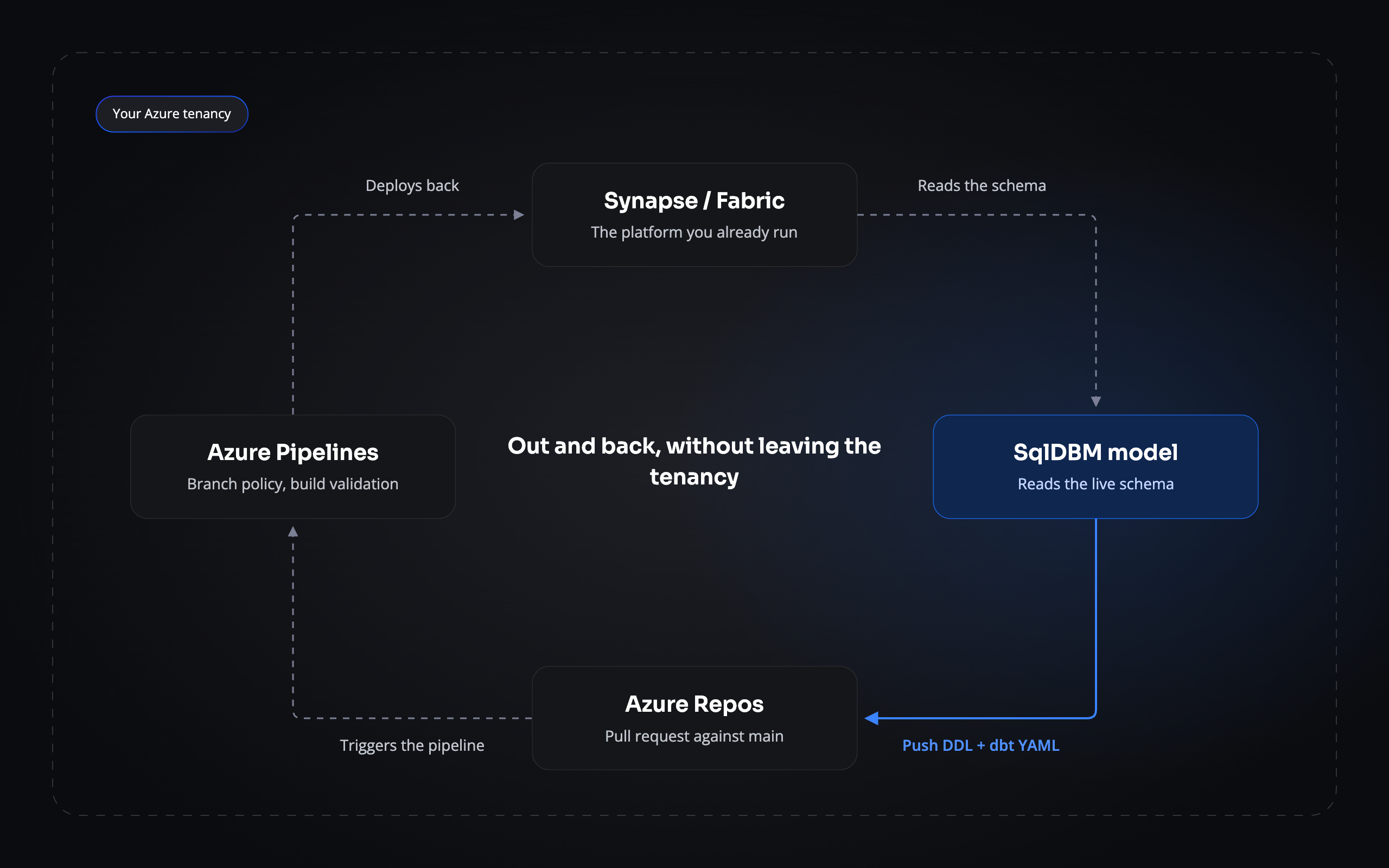
Model Synapse or Fabric, push the DDL to Azure Repos, let Pipelines deploy it. The whole loop stays inside your tenancy.
THE PROBLEM
The model is the one thing that leaves the tenancy
Everything else in your estate has a home inside Azure. Work items in Boards, code in Repos, deployments in Pipelines, packages in Artifacts — one identity, one set of policies, one audit trail. The data model is the exception. It gets designed somewhere else, exported as a script, and carried back across the boundary by whoever happens to be doing it that week.
- It crosses the boundary twice. Out to be designed, back to be deployed, with nothing governing either trip.
- Branch policies don’t reach it. Required reviewers and build validation govern code. The ALTER that reshapes a table meets neither.
- Half the audit trail is missing. Azure records what Pipelines deployed. Nothing records what the schema was meant to be, or who decided.
THE ROUND TRIP
Out and back without leaving Azure
SqlDBM reads your Synapse or Fabric schema directly, then pushes the DDL and dbt YAML it generates into Azure Repos — as a commit, or as a pull request against main. From there it’s an ordinary change: branch policies apply, Pipelines run, and the deployment lands back on the platform the model came from. One token covers the repositories in its organization, so several projects can share a single connection.
IN AZURE REPOS
Pull requests your policies already govern
Every push opens a pull request against main, authored by SqlDBM and named for the project and revision it came from. Required reviewers, build validation and merge checks apply to it the way they apply to anything else in the repository. There’s no second approval path to design, and no exception to write into your change process.
showing SqlDBM-authored PRs and the left nav
Connecting Azure DevOps
1
Create a personal access token
In Azure DevOps, go to User settings → Personal Access Tokens and create one with read and write access, or full access. Azure shows it once, so copy it immediately — and note the expiry date you chose.
2
Add the connection in SqlDBM
On the User Connections page, choose Azure DevOps and paste the token.
3
Point it at a repository
Initialise a repository with at least one file on main, copy its URL and give it to SqlDBM. You can only link repositories in the organization the token belongs to.
4
Choose how pushes arrive
Decide whether SqlDBM opens a pull request or commits directly. Commits appear under Files → Commits; pull requests under Pull requests.
Azure DevOps tokens carry an expiry date. When it passes, the connection stops working — worth a calendar reminder a week before.
THE PAYOFF
What stays inside the boundary
One identity governs the change
The push is made by the token’s identity within its organization, not by a personal database login nobody manages.
Branch policies cover the schema
Required reviewers and build validation apply to a table definition exactly as they apply to a class.
Pipelines do the deploying
The change reaches Synapse or Fabric by the same path as every other deployment, with the same record of what ran and when.
Nothing crosses the boundary
Model, repository, pipeline and platform all sit inside the tenancy you already audit.
Related Integrations
GitHub
The same push workflow, outside the Microsoft stack.
AWS CodeCommit
The equivalent for teams building on AWS.
dbt
Source and model YAML over the same connection.
Token scopes, organization limits and troubleshooting, in full.
Trusted by data teams globally
400,000+ users globally